Locks are in a weird spot in the smart home world. There is great technology from Apple in Home Key for home locks that I’ve found very helpful. Though the Apple Home/HomeKit eco-system is limited and still walled off even with the addition of Thread.
Many people will find Home Assistant (HA) to be the go-to regarding cross eco-system smart homing. The issue with this is that the open source community hasn’t cracked the Home Key functionality yet so HA doesn’t have the functionality available.
All this being said there seems to be a way to have best of both worlds with the Aqara U100. By using a bridge from them(E1 Hub in my case), you get the opportunity to have the hub present the lock to HomeKit and to HA.
I saw many folks connect the E1 to Apple Home and then remove it to get it onto the wifi. This showed up in HA as a HomeKit device which doesn’t seem like the way to go.
Setup
I’ve had the U100 setup in HomeKit for a while so I’ll document my steps from there.
- I removed the U100 lock from my Apple Home.
- Plugged in the E1 and set it up in the Aqara app. Made sure it was fully up to date. This took a couple of updates so check for updates even after an update.
- I added the U100 to the Aqara app and bound it to the hub.
- Then bound the lock to Apple Home by finding the “Other Platforms” section of the lock settings. This got the Home Key functionality to the lock.
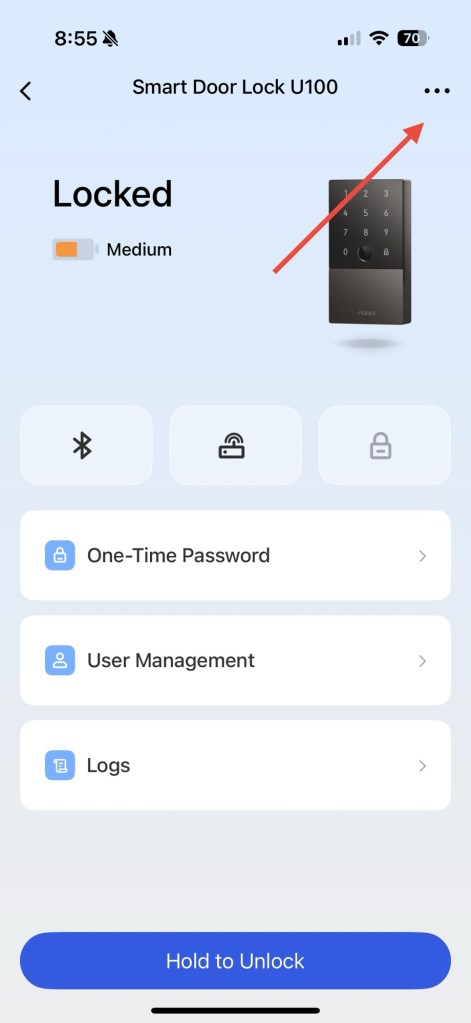
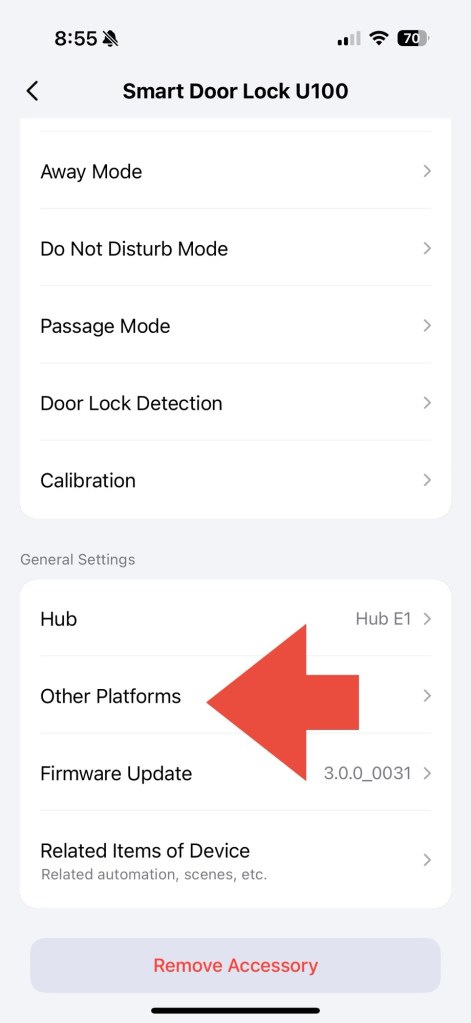
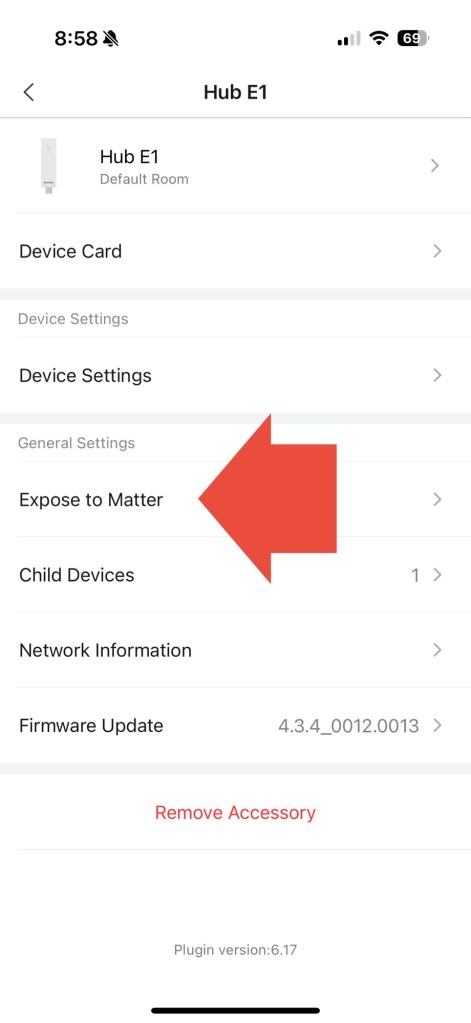
- Now go to the E1 Settings in the Aqara app and “Expose to Matter”. Copy the code.
- Now to add it to HA you need to use a mobile device. Adding a new matter connection in HA on my iPhone brings up what looks like an Apple Home prompt. This through me off and I thought I was doing something wrong. This is actually right and is just how the iPhone handles Matter related requests, even from third party apps. Also it defaults to scanning a QR code which is shown in the Aqara app so you can’t scan anything. You have to tap “More options” above the view finder. The E1 Hub showed in the nearby section for me. After tapping it, I pasted the pairing code previously copied from the Aqara app.
Note: The state of the lock was out of sync after initial connections. After using HA, Apple Home and the Aqara app to lock and unlock it, it still was saying it was unlocked even though it was locked. Had to restart HA for the proper states to be picked up for the lock. The last 3 days since setup have been flawless!
Conclusion
I think this setup is really great for a couple of reasons
- This is fully local!
- Other options to retain UWB with HA I found (schlage) required the use of their cloud service 🤢
- I have the hub unable to access the internet without issue
- The internet seems to think and I agree, the battery life shouldn’t be affected by this setup. The lock is presented to two smart home systems independently but the always on hub is used for communication. Not the battery powered lock, retaining a single connection for the lock.
Can’t wait for the next Smart Home challenge I have!


 j1philli blog
Leave a comment